

I signed up for the Children with Cancer UK 10 Mile Challenge — walk miles throughout August, log them on the fundraiser page, raise money for a great cause. I had the walking done. What I didn’t want to do was spend an evening manually entering 31 separate activity entries with dates and mileage conversions.
So I automated it. Here’s the exact step-by-step process, from raw Google Fit export to a fully populated fundraiser page — using a Jupyter notebook for data prep and Manus AI for the web form entry.

👣 Steps
1. Export Your Google Fit Data
Head to Google Takeout and export your Fit data. You’ll get a zip file containing daily CSV files — one per day — with columns for steps, heart rate, calories, distance, oxygen stats, and more.
Each file looks something like this:
Start time,End time,Move Minutes count,Calories (kcal),Distance (m),
Heart Points,Heart Minutes,Avg heart rate,Max heart rate,Min heart rate,
...,Step count,...
The column we care about is Step count — but it’s buried among 20+ other fields. That’s why we need the next step.
2. Clean the Data with a Jupyter Notebook
I used Google Colab to write a short notebook that reads all 31 daily CSVs and extracts just the step count per day.
Cell 1 — Import pandas:
import pandas as pdCell 2 — Loop through all 31 days and aggregate:
final_df = pd.DataFrame(columns=['date', 'steps'])
for i in range(31):
    date = f'2026-08-{str(i+1).zfill(2)}'
    df = pd.read_csv(f'/content/{date}.csv')
    total_steps_of_the_day = int(df['Step count'].sum())
    new_row = pd.DataFrame({'date': date, 'steps': total_steps_of_the_day}, index=[0])
    final_df = pd.concat([final_df, new_row], ignore_index=True)
Cell 3 — Preview the result:
final_dfThis outputs a clean table:
| date | steps | |
|---|---|---|
| 0 | 2026-08-01 | 13697 |
| 1 | 2026-08-02 | 15789 |
| 2 | 2026-08-03 | 15634 |
| … | … | … |
| 30 | 2026-08-31 | 6854 |
Cell 4 — Export to CSV:
final_df.to_csv('/content/Steps_08_26.csv')The output is a tidy two-column file: date and steps. Total for August: 472,434 steps.

3. Upload to Manus AI and Give It a Prompt
Open Manus.im, upload Steps_08_26.csv, and tell it what you want. Here’s the exact prompt I used:
I want Manus to fill up the fundraising details on a website for Children with Cancer UK with my steps details. Here’s the access link [URL]. You have the step details in the CSV.
That’s it. One paragraph. Manus takes it from here.
4. Answer Manus’s Clarifying Questions
Manus didn’t blindly start entering data. It read the CSV, inspected the fundraiser site, and came back with two smart questions:
Question 1 — Unit mismatch:
The activity form accepts miles, not steps. Your CSV records 472,434 steps from 1–31 August 2026, but it does not contain a distance or a steps-to-mile conversion. Please tell me the conversion you want used.
My answer: 2,000 steps = 1 mile
Question 2 — Entry format:
Option A — One cumulative entry of 236.22 miles dated 31 August. Option B — 31 separate entries, each dated and converted from that day’s steps.
My answer: B (daily records)
This is exactly what you want from an AI agent — it identifies problems before they become mistakes and gives you clear options.
5. Let Manus Do the Work
After my answers, Manus:
- Wrote a Python conversion script using
Decimalwith half-up rounding to avoid floating-point errors:
from decimal import Decimal, ROUND_HALF_UP

STEPS_PER_MILE = Decimal('2000')

for record in csv.DictReader(source_file):
    exact_miles = Decimal(steps) / STEPS_PER_MILE
displayed_miles = exact_miles.quantize(Decimal('0.01'), rounding=ROUND_HALF_UP)- Generated a daily mileage schedule — a markdown table with date, steps, and miles for all 31 days:
| Date | Steps | Miles to post |
|---|---|---|
| 1 August 2026 | 13,697 | 6.85 |
| 2 August 2026 | 15,789 | 7.89 |
| 3 August 2026 | 15,634 | 7.82 |
| … | … | … |
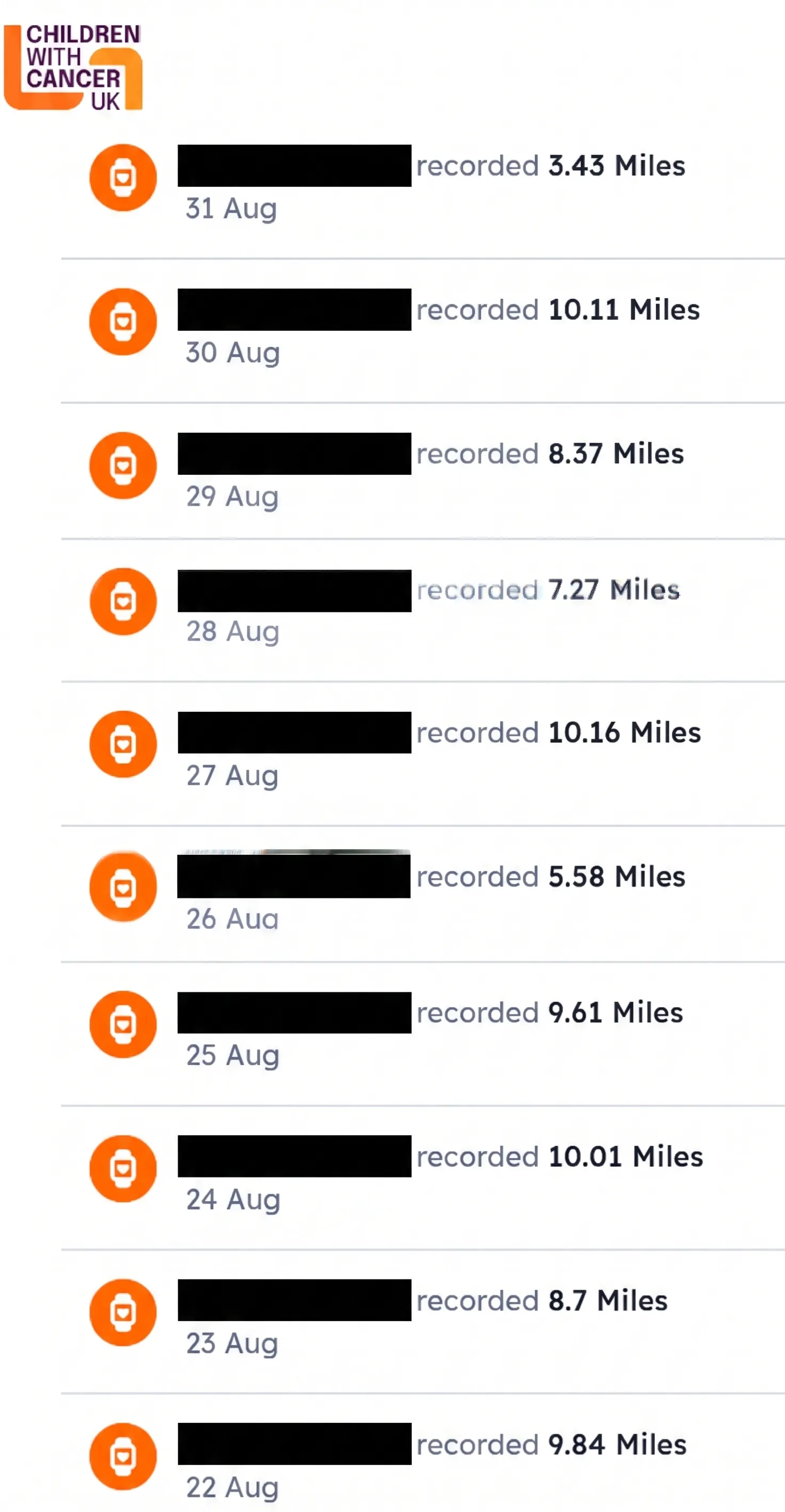
| 30 August 2026 | 20,212 | 10.11 |
| 31 August 2026 | 6,854 | 3.43 |
- Posted all 31 entries to the Children with Cancer UK fundraiser site — one by one, each with the correct date and mileage. Every submission returned HTTP 200.
6. Verify the Result
After all 31 entries were posted, the live Activity challenge tracker displayed 236.23 miles — matching the expected sum of the 31 individually rounded daily values.
- ✅ 31 entries posted
- ✅ All HTTP 200 responses
- ✅ Public tracker shows correct total
- ✅ Login token expired after completion (task done)
📊 The Numbers
| Metric | Value |
|---|---|
| Total steps | 472,434 |
| Total miles | 236.23 |
| Days recorded | 31 |
| Average daily steps | ~15,240 |
| Highest day | 20,833 steps (5 August) |
| Lowest day | 6,854 steps (31 August) |
🛠️ What You Need to Replicate This
- A Google Fit account with step data
- Google Takeout export of Fit data
- A Jupyter/Colab environment with pandas
- A Manus.im account: use my reference link and you can get 500 credits.
- A web form that accepts activity entries (with date + distance)
🧠 Final Thoughts
The whole process took about 15 minutes of my time — mostly writing the prompt and answering two questions. The Jupyter notebook took 5 minutes to write, and Manus handled the rest.
The key insight? The data preparation step is where the real value is. If you can get your data into a clean, simple CSV — two columns, no junk — you open the door for AI agents to do the rest. Manus couldn’t have done anything with 31 raw Google Fit exports. But with a tidy CSV? It was smooth sailing.
Resources
- Manus AI: manus.im
- Google Takeout: takeout.google.com
- Python Decimal module: docs.python.org/3/library/decimal.html
- Manus AI: The Dawn of True General AI Agents:https://wowlabz.com/manus-ai-true-general-ai-agent