

Today we move our project out of the “hobbyist” stage and into the “professional” stage. It’s time to talk about Security and Configuration Management.
Up until now, we’ve hardcoded things like our SECRET_KEY and Database URLs. Now, we learn how to use Pydantic Settings and .env files to keep our sensitive data safe and our app configurable for different environments (Development, Testing, Production). If you ever share your code on GitHub, anyone can see your SECRET_KEY. Today, we hide it.
Why Pydantic Settings?
FastAPI is built on Pydantic, so it makes sense to use Pydantic for settings. It gives us:
- Type Validation: Ensures your
DATABASE_URLis a valid string. - Default Values: Provide a local SQLite path by default, but override it with PostgreSQL in production.
- Environment Priority: It can read from the OS environment, a
.envfile, or use default values.
Implementation
Step 1: Install the Required Library
First, install the required library using uv:
uv add pydantic-settingsThis installs pydantic-settings==2.12.0 and its dependency python-dotenv==1.2.1.
Step 2: Create config.py
Create a config.py file in your project root:
from pydantic_settings import BaseSettings, SettingsConfigDict


class Settings(BaseSettings):
    """
    Application settings loaded from environment variables or .env file.

    This provides type-safe configuration management with validation.
    Settings are loaded in this priority order:
    1. Environment variables
    2. .env file
    3. Default values (if specified)
    """
    app_name: str = "My FastAPI App"
    admin_email: str
    items_per_user: int = 20
    secret_key: str
    database_url: str = "sqlite:///./sql_app.db"
    algorithm: str = "HS256"
    access_token_expire_minutes: int = 30

    # This tells Pydantic to read from a .env file
    model_config = SettingsConfigDict(env_file=".env")


# Singleton instance - import this in your app
settings = Settings()
Step 3: Create the .env File
Create a file named .env in your root directory (and add it to your .gitignore immediately!):
ADMIN_EMAIL="admin@example.com"
SECRET_KEY="your-super-ultra-secret-key-change-this-in-production"
ITEMS_PER_USER=50
Important: Add .env to your .gitignore:
# Environment variables
.env
Step 4: Create .env.example
Create a template file for other developers:
# Environment Configuration Template
# Copy this file to .env and fill in your actual values

# Required Settings
ADMIN_EMAIL="admin@example.com"
SECRET_KEY="your-secret-key-here"

# Optional Settings (defaults shown)
ITEMS_PER_USER=50
DATABASE_URL="sqlite:///./sql_app.db"
ALGORITHM="HS256"
ACCESS_TOKEN_EXPIRE_MINUTES=30
Step 5: Update security.py
Replace hardcoded constants with settings:
from passlib.context import CryptContext
from jose import jwt
from datetime import datetime, timedelta, timezone
from config import settings

pwd_context = CryptContext(schemes=["bcrypt"], deprecated="auto")

def create_access_token(data: dict, expires_delta: timedelta | None = None) -> str:
    """Generates a JWT token with an optional expiration time."""
    to_encode = data.copy()
    if expires_delta:
        expire = datetime.now(timezone.utc) + expires_delta
    else:
        expire = datetime.now(timezone.utc) + timedelta(minutes=settings.access_token_expire_minutes)

    to_encode.update({"exp": expire})
    encoded_jwt = jwt.encode(to_encode, settings.secret_key, algorithm=settings.algorithm)
    return encoded_jwt
Step 6: Update database.py
Replace hardcoded database URL:
from sqlalchemy import create_engine
from sqlalchemy.ext.declarative import declarative_base
from sqlalchemy.orm import sessionmaker
from config import settings

engine = create_engine(
    settings.database_url, connect_args={"check_same_thread": False}
)
SessionLocal = sessionmaker(autocommit=False, autoflush=False, bind=engine)
Base = declarative_base()
Step 7: Update main.py
Import settings and use them in your app:
from config import settings

# In get_current_user dependency
payload = security.jwt.decode(
    token, settings.secret_key, algorithms=[settings.algorithm]
)

# Add a demo endpoint
@app.get("/info")
async def get_info():
    """
    Demonstrates how to use settings in your application.
    Returns app name and admin email from environment configuration.
    """
    return {"app_name": settings.app_name, "admin": settings.admin_email}
Using Settings in Your App
You can now import settings anywhere in your app. It’s a clean, singleton-style object.
from config import settings

@app.get("/info")
async def get_info():
    return {"app_name": settings.app_name, "admin": settings.admin_email}
Testing
All existing tests should pass without modification:
uv run pytest -vTest that settings are loaded correctly:
uv run python -c "from config import settings; print(f'App: {settings.app_name}')"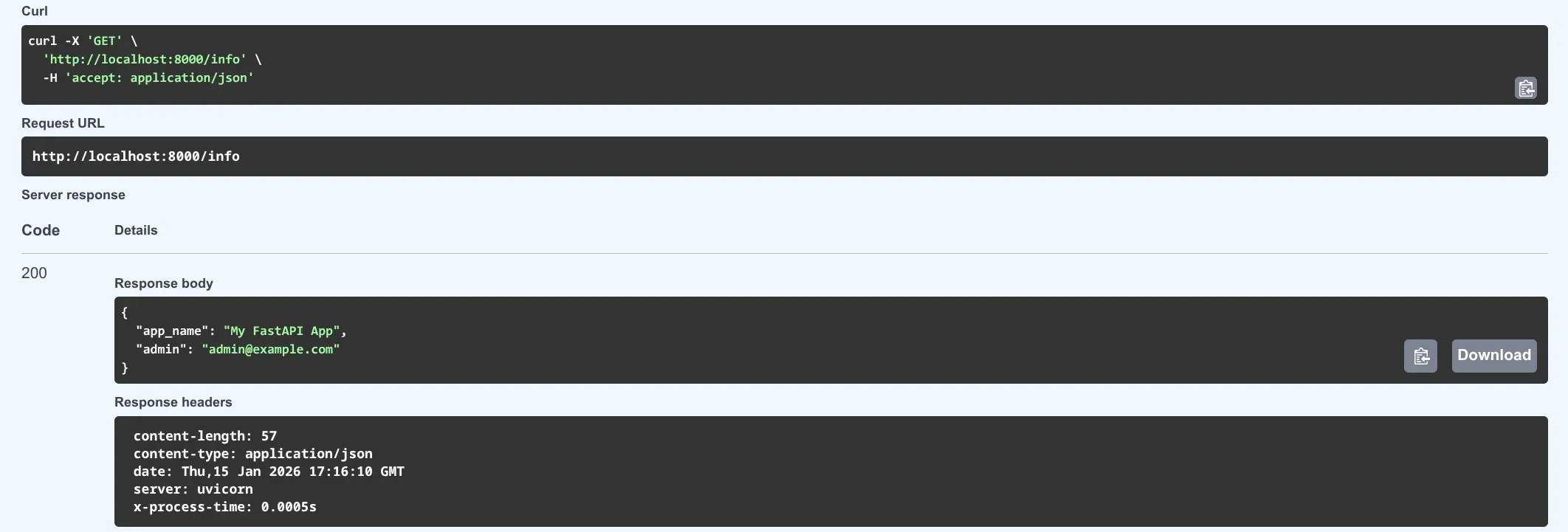
🛠️ Implementation Checklist
- Installed
pydantic-settingsvia uv. - Created a
Settingsclass inheriting fromBaseSettings. - Moved
SECRET_KEYandDATABASE_URLfrom source files to.env. - Added
.envto.gitignore. - Created a
.env.exampleas a template for other developers. - Updated
security.pyto use settings. - Updated
database.pyto use settings. - Updated
main.pyto use settings. - Added
/infoendpoint to demonstrate settings. - All tests pass successfully.
📚 Resources
- Official Docs: FastAPI Settings and Environment Variables
- Pydantic Docs: Pydantic Settings Overview
- Book: FastAPI: Modern Python Web Development (Chapter 11: Deployment and Configuration).
Summary
Your project has now moved from hardcoded secrets to professional configuration management. Your SECRET_KEY and other sensitive data are safe, your code is ready to share on GitHub, and you can easily configure different environments by simply changing environment variables or the .env file.